Your training operations live in ten places. Run them from one.
Deliverr is the training management system for IT training companies: scheduling, instructors, rooms, conference links, enrollments and the numbers of each course, in one system.
Built for
Built for companies that deliver instructor-led training
Public courses you sell yourself, private classes for a client, or delivery on behalf of a vendor: the operation underneath is the same. The right instructor in the right time zone, the room or the link ready, every learner informed, proof that the course happened, and the invoice data at the end. Deliverr runs all of it in one place, built by a founder who ran it for 25 years.
The Problem
Your tools weren't built to run live training
A CRM, a system built years ago, a spreadsheet: each one covers part of the job. Instructors, rooms, Zoom, Teams and Webex sessions, enrollments and invoicing end up spread around it, held together by people.
Problem #1
One change, five manual updates
Your system has the course, but the instructor, the session link, the client contact and the calendar live somewhere else. A date changes and you update each one by hand. Miss one and you find out when it's too late to fix.
Problem #2
Your operation depends on one person
Whatever your system doesn't cover lives in one coordinator's head. When they're on vacation, sick or gone, everything slows down. And to know what's confirmed next month, you have to ask them.
Problem #3
Money slips through the cracks
Your CRM closes the deal, but it can't tell you which courses still need seats to pay off. An enrollment that never got invoiced, a PO that never arrived: small leaks nobody sees until the month closes.
Problem #4
Proving the training actually happened
Your client, funding body or auditor wants proof: who attended each day, that the instructor was really there, and certificates that hold up. So you chase signed sheets, photos sent over chat and spreadsheets, course by course. One missing day can hold back the payment.
Meet the founders
Born from 25 years in training operations
Pablo Chirico
Co-founder
Deliverr was conceived by Pablo Chirico, co-founder, and the person who lived this problem from every side of a training business. He worked in training presales, spent several years as a freelance instructor delivering vendor-certified programs around the world, and then spent several years as a managing partner of a training company, where the schedule, the instructors, the margin, and the client were all his to carry.
He lived every scenario this product solves: chasing instructor availability over chat threads, working with Excel files that were always one version behind, and dealing with a cascade of manual updates every time a client moved a date.
Augusto Chirico
Co-founder
Augusto Chirico has spent more than two decades building software: leading engineering teams and architecting the platforms behind products used across the Americas and Europe, from fintech to artificial intelligence.
At Deliverr, Augusto turns Pablo's experience from inside the training business into a platform that keeps every course, instructor and change in one place, built for the day-to-day of a training company.
Everything your team needs, in one place.
Sell
From first conversation to a course on the calendar
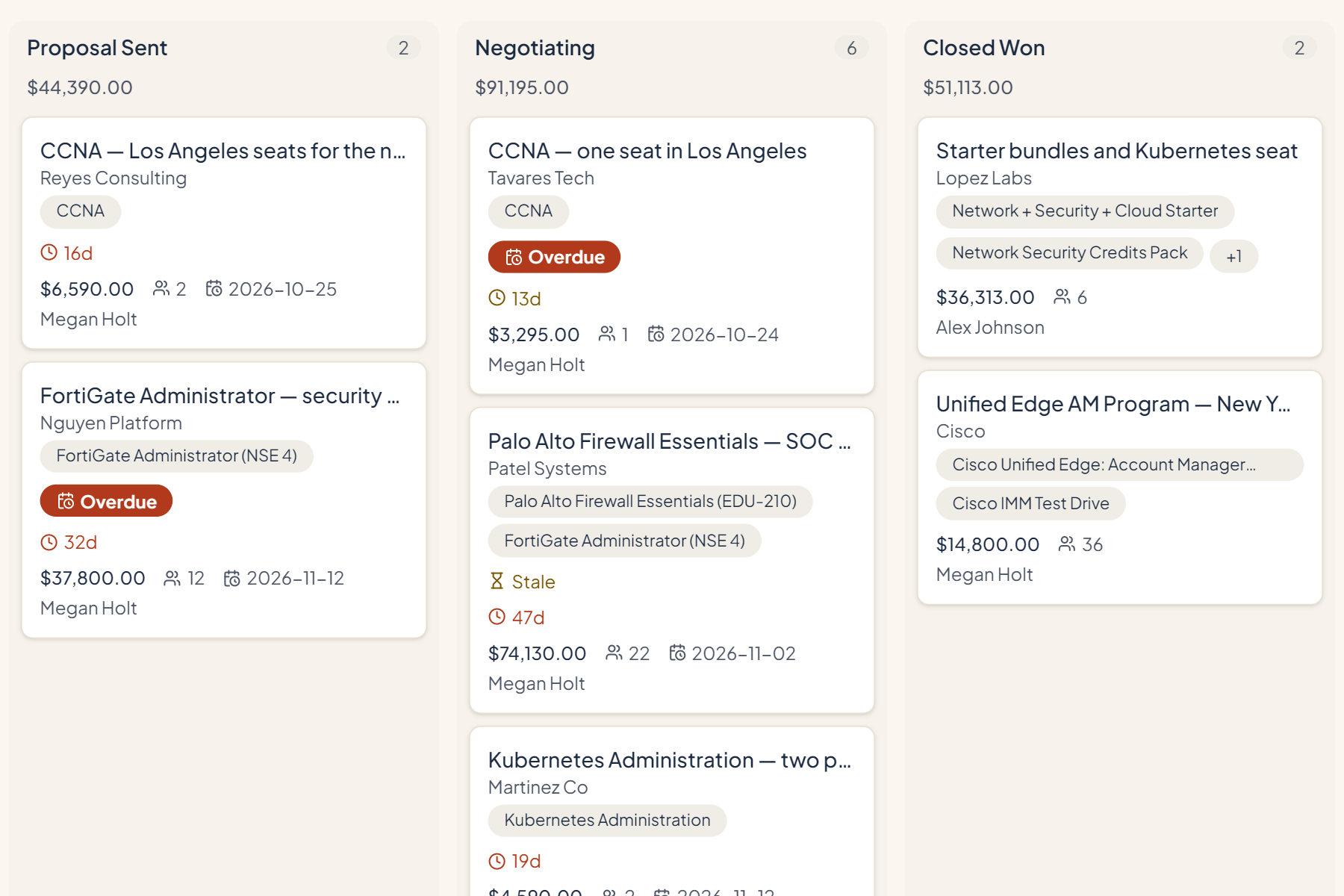
Opportunities on a board or a list, moved between stages by dragging them.
One proposal with several courses, or a course bundle sold as one product.
Close the deal and the course is created, or the client is enrolled in one that already exists.
Follow-ups with reminders, so a deal never goes quiet without anyone noticing.
On Professional, the revenue forecast counts your open opportunities: weighted by their probability, with the best case beside it.
On Professional, a price and currency per operational center: each center's courses start at its own price, and a bundle in another currency still shows its savings.
Publish your calendar. Take registrations and payments.
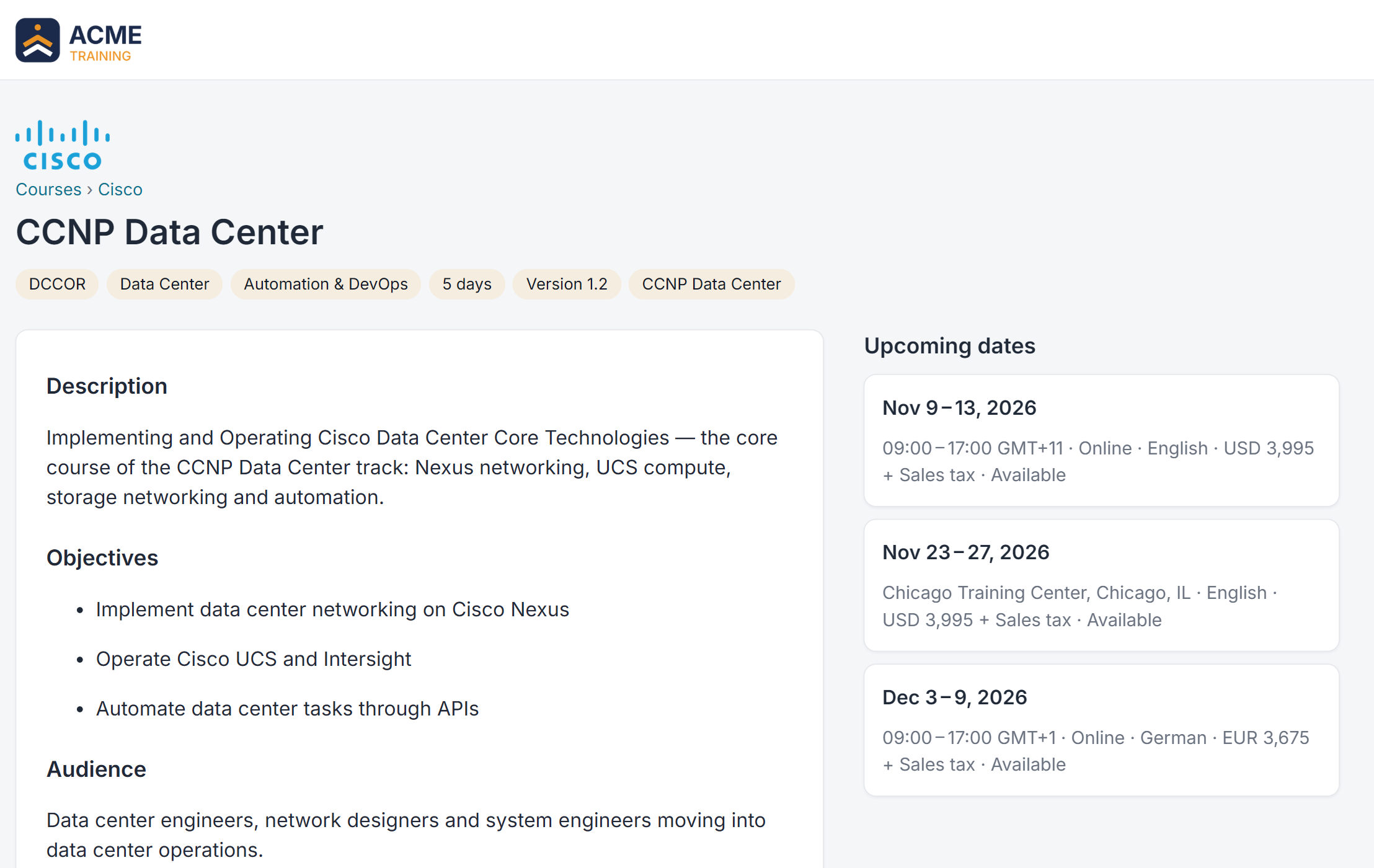
Course pages hosted by Deliverr on your own subdomain or a folder of your own website, or blocks you embed in your current website. They update as you change the courses.
Online registration and card payment through your own Stripe account. Coming soon
When a seat frees up, the next person on the waitlist gets the offer by email and accepts or declines it online.
Mark a course as guaranteed to run, and show it on the web.
One change updates everything. Including the calendars.
Define the course once in the catalog, on consecutive days or on set days of the week. Every edition starts complete.
Webex, Zoom and Teams links created for every session.
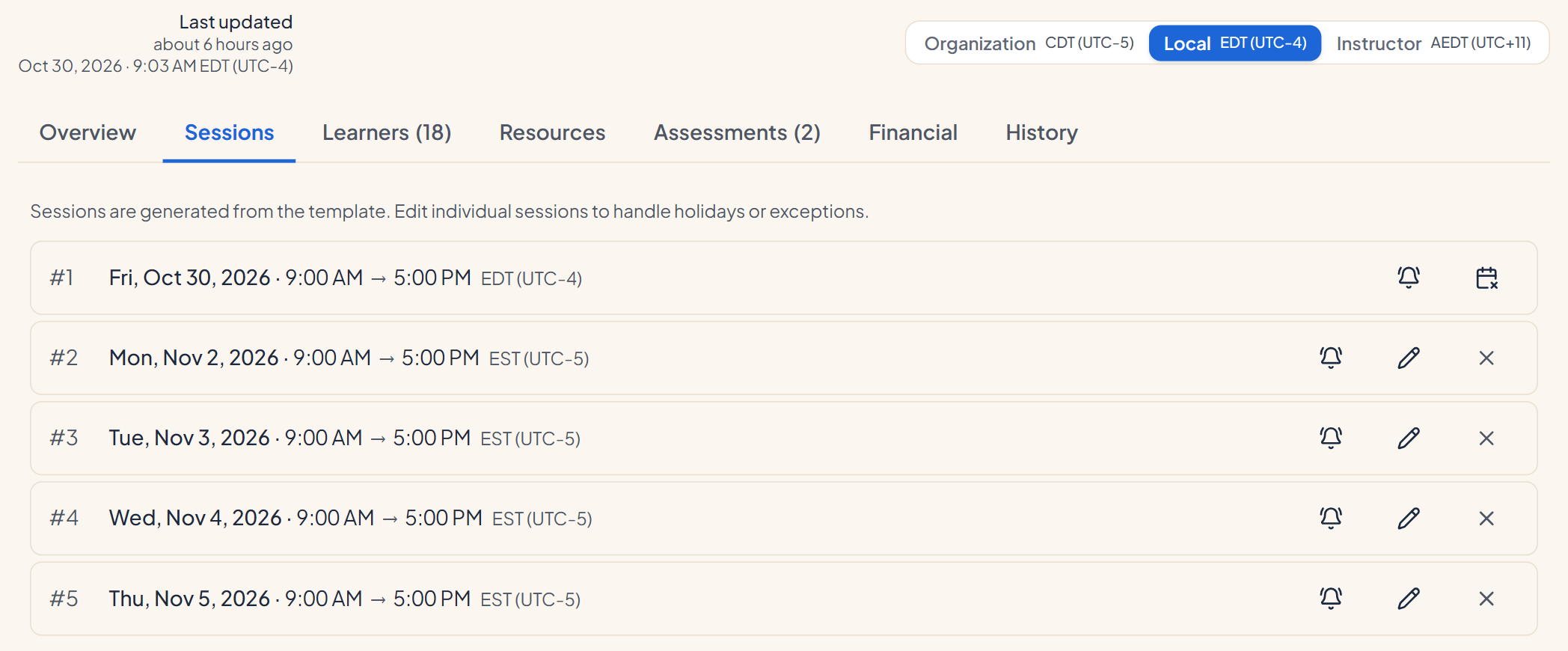
Every course in your time zone, the venue's and the instructor's, with daylight saving time handled for you.
Your instructors' calendars updated automatically.
On Growth, a room per session: when sessions move, Deliverr checks the room on each new date and proposes a free one.
On Enterprise, a coordinator per operational center: each one sees and schedules only their centers' courses, and a Shared center stays visible to everyone.
Every learner informed. Every session accounted for.
Confirmation and reminders with each session's join link and its note for learners, from your own templates, sent by hand or automatically. Each session's recording too, if you share recordings.
Every message kept in the learner's history.
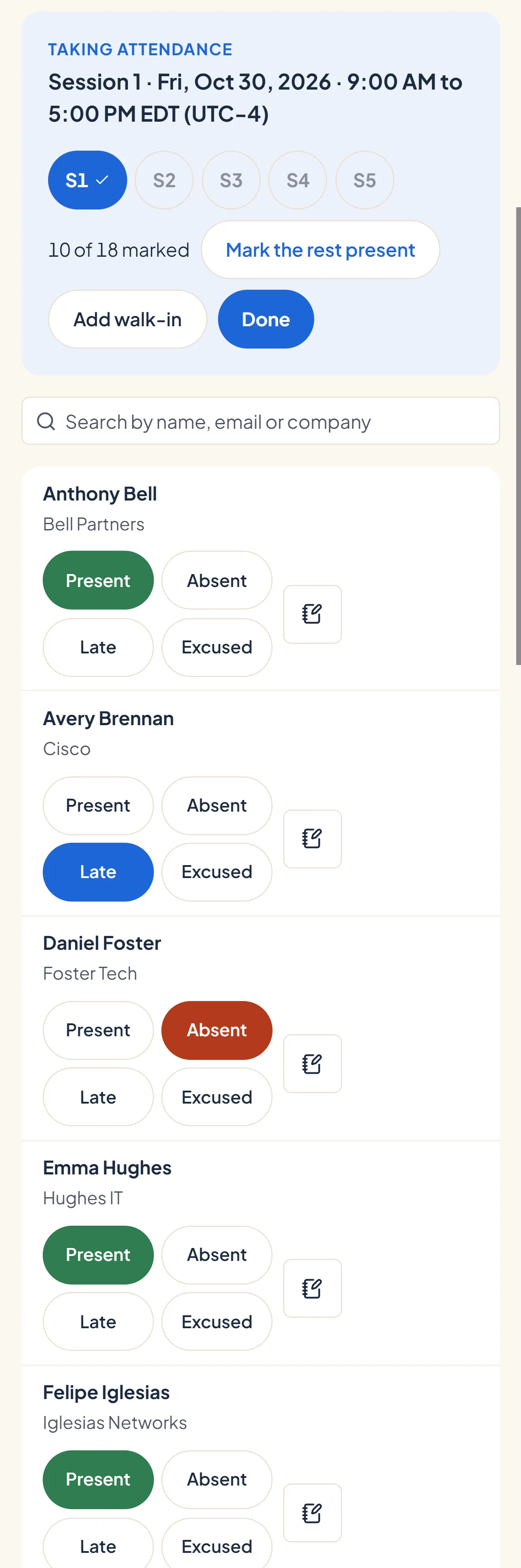
Attendance per session from the instructor's phone, even with no connection: present, absent, late or excused, and walk-ins.
Surveys and quizzes by personal link or a QR code in the classroom.
An instructor app for iOS and Android: courses, learner lists and attendance, even offline. Coming soon
Certify
Certificates with your brand, verifiable by anyone
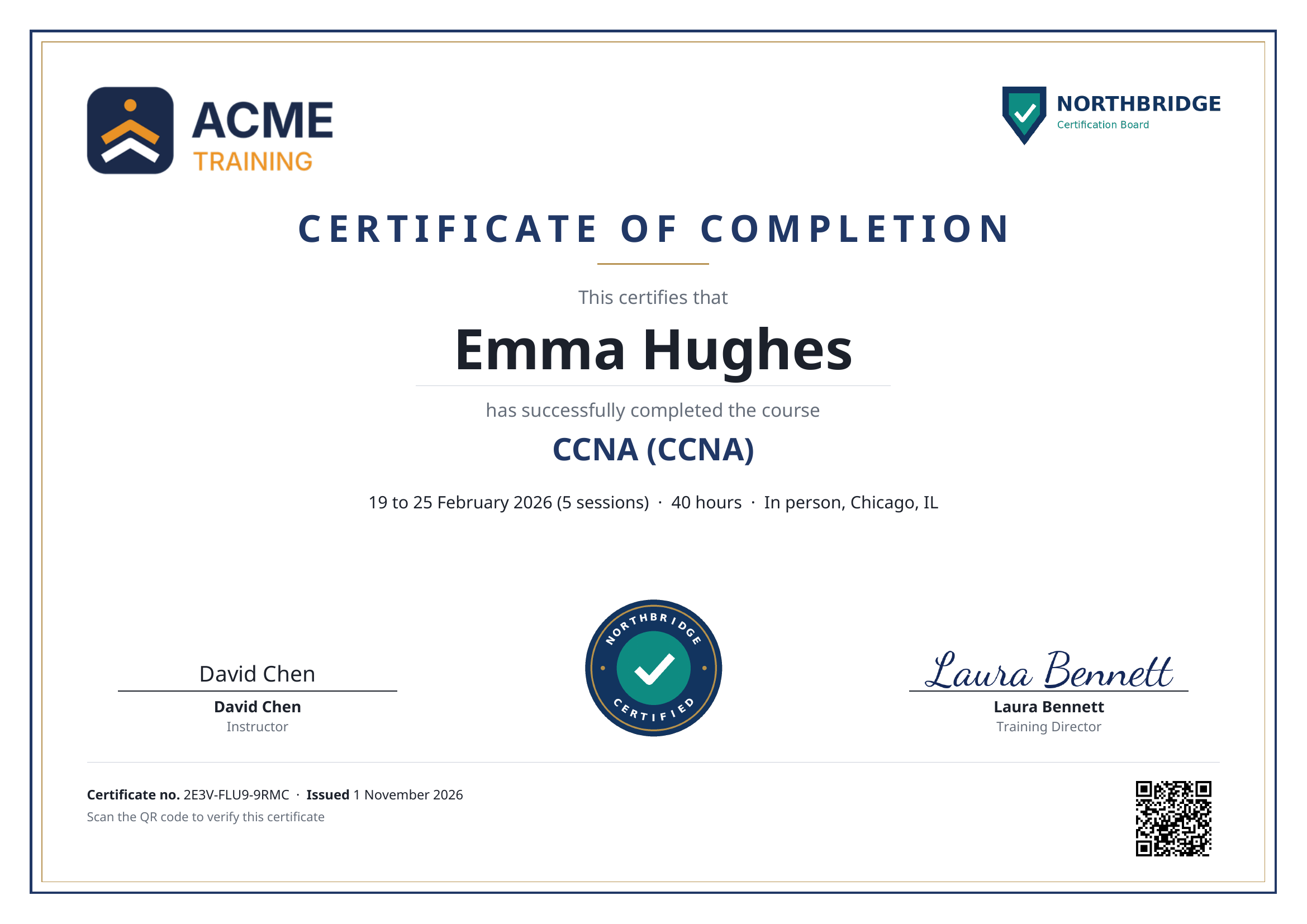
Your logo, and your vendor's or accrediting body's logo and seal. Never ours.
Issue to one learner or to everyone who met the attendance threshold, and email them.
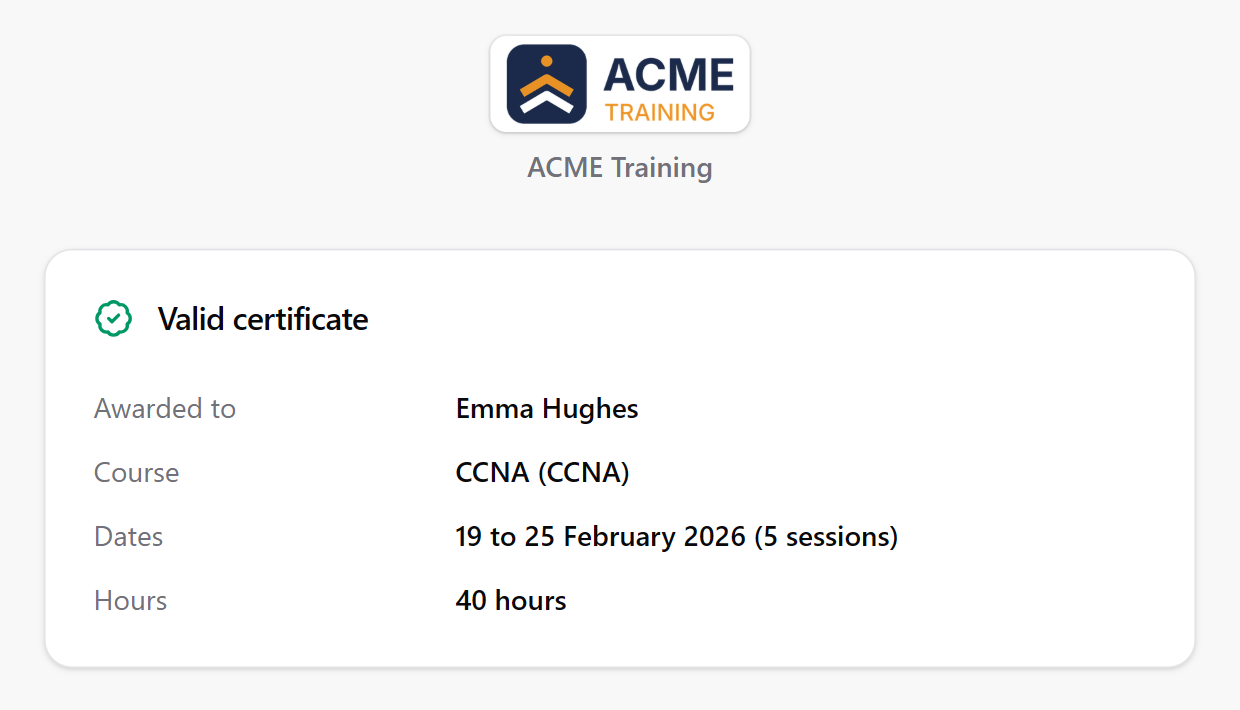
A public verification page for every certificate code.
Issued automatically when the course is completed, or with your own certificate design.
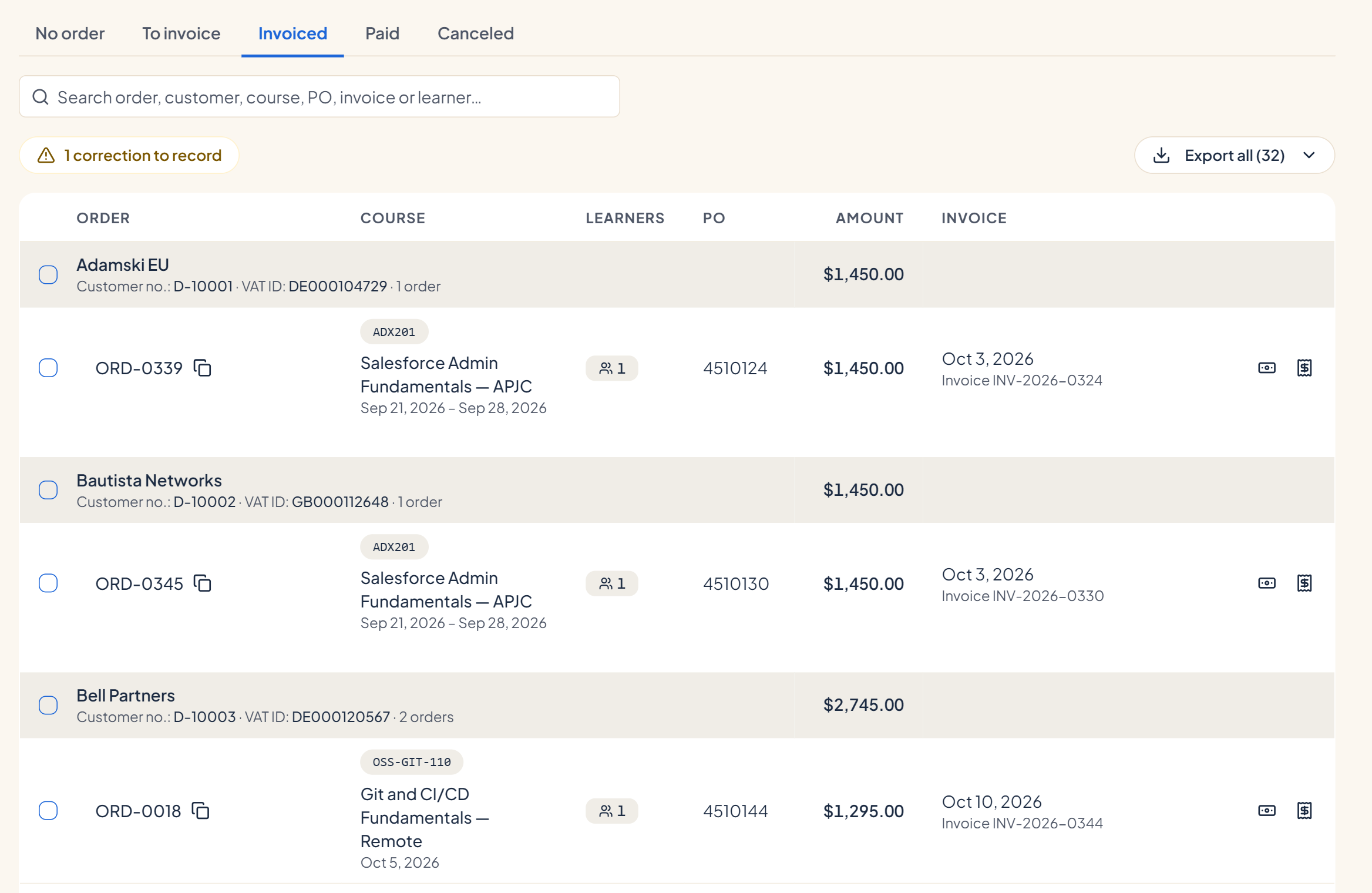
Orders and seat reservations with POs, expiry dates, and cancellation and no-show fees.
One Billing page: what to invoice, what is invoiced, what is paid.
Export the invoice data to your accounting system, send it to QuickBooks Online, or connect it through the Billing API. No accounting system? In the US, UK, Canada, Australia and New Zealand, Deliverr can issue and send the invoices itself.
A portal where your clients see their courses, certificates and orders, and download each course's evidence pack.
Courses pushed to your instructors' calendars, and their busy time read back.
Microsoft sign-in
Your team signs in with their Microsoft 365 account.
Webex sign-in
Your team signs in with their Webex account.
Billing API
Your accounting system reads what to invoice and sends back invoices and payments.
Read API
Connect Power BI or your own systems to your Deliverr data.
Webhooks
Your other systems hear about every change as it happens.
QuickBooks Online
Orders sent as invoices, and their payments back in Deliverr.
Stripe Coming soon
Online registration and card payment.
How Deliverr compares to what you use today
Compare Deliverr with
Feature
Spreadsheets and email
A generic CRM
A system you built
A typical TMS
Deliverr
The whole course in one place (sessions, instructor, room, link, seats)
No
Only with heavy customization
Depends on what was built
Yes
Yes
Instructor and room double-booking blocked
No
No
Depends
Yes
Yes
Webex, Zoom or Teams links created for each course
No
No
Rarely
Varies
Yes
Times in your, the venue's and the instructor's time zones
No
No
Rarely
Varies
Yes
Sales pipeline tied to each course
No
Yes, but not to the course
Rarely
Varies
Yes
The numbers of each course before you confirm it
Manual
No
Depends
Varies
Yes
Fees per learner or per registration
No
No
No
Often
Never
Maintenance on your side
Constant
Admin and customizations
Developers
None
None
Built for IT training companies, by a founder who ran one.
Sound familiar?
See how Deliverr handles it, in 45 minutes.
Once you see it, you can't unsee it.
Plans
Built to scale with your operations
Pricing is discussed during the demo. Plans are annual, paid yearly or monthly, with no setup fee to get started.
Core
Run every course and fill it, from one place.
✓Course scheduling, on consecutive days or on set days of each week, and instructor assignment across regions
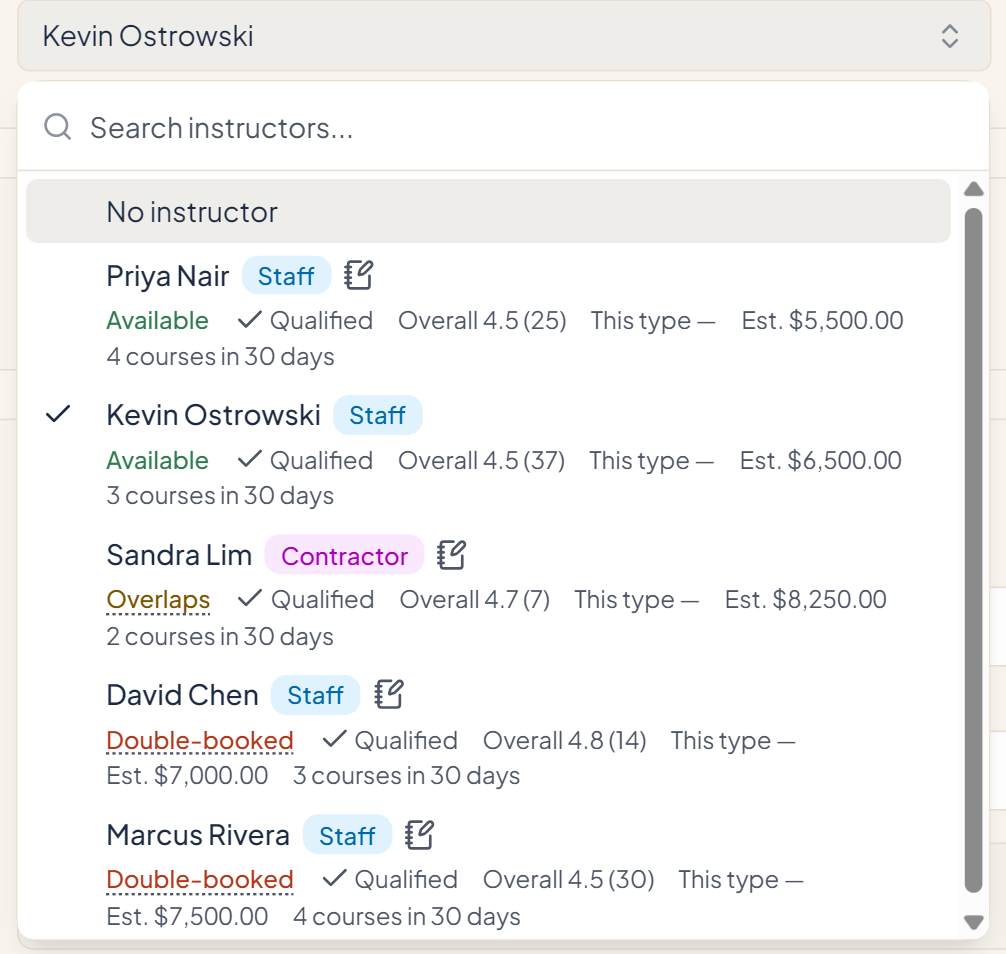
✓Instructor finder: qualified courses, languages, availability and workload, with double-booking blocked
✓Timezone engine: every course, venue and instructor in their own timezone, with no math by hand
✓Enrollment management: capacity, a waitlist that offers freed seats, CSV import/export
✓Course publishing: pages hosted by Deliverr on your own subdomain or a folder of your own website, and blocks you embed in your website
✓Orders and seat reservations: POs, cancellation and no-show fees, and a Billing page that hands your accounting what to invoice
✓QuickBooks Online connector: orders sent to QuickBooks as invoices, and their payments back in Deliverr
✓Deliverr Assessments: surveys and quizzes with a score, pass or fail and a final result per learner; a personal link per learner and a course link with QR code
✓Conferencing sessions created automatically (Zoom, Webex, Teams)
✓Proof of Delivery upload and tracking per course
✓Companies and account history: each corporate client's contacts, courses and enrollments
✓Learner emails: confirmation, reminders, each session's join link, note and recording (optional), and cancellation from your own templates, every message kept in the learner's history
✓Attendance per learner and per session, even with no connection: it is sent when the connection returns
✓Completion certificates with a public verification page
✓A dashboard each person arranges: “Needs attention” first, then the widgets they pick
✓Instructor app for iOS and Android: their courses, learner lists and attendance, even offline (coming soon)
Support: email · 72h response
Growth
Sell with a pipeline and know the money of every course.
Everything in Core, and:
✓Sales pipeline: one proposal with several courses, closed deals that create the course, and a win/loss report
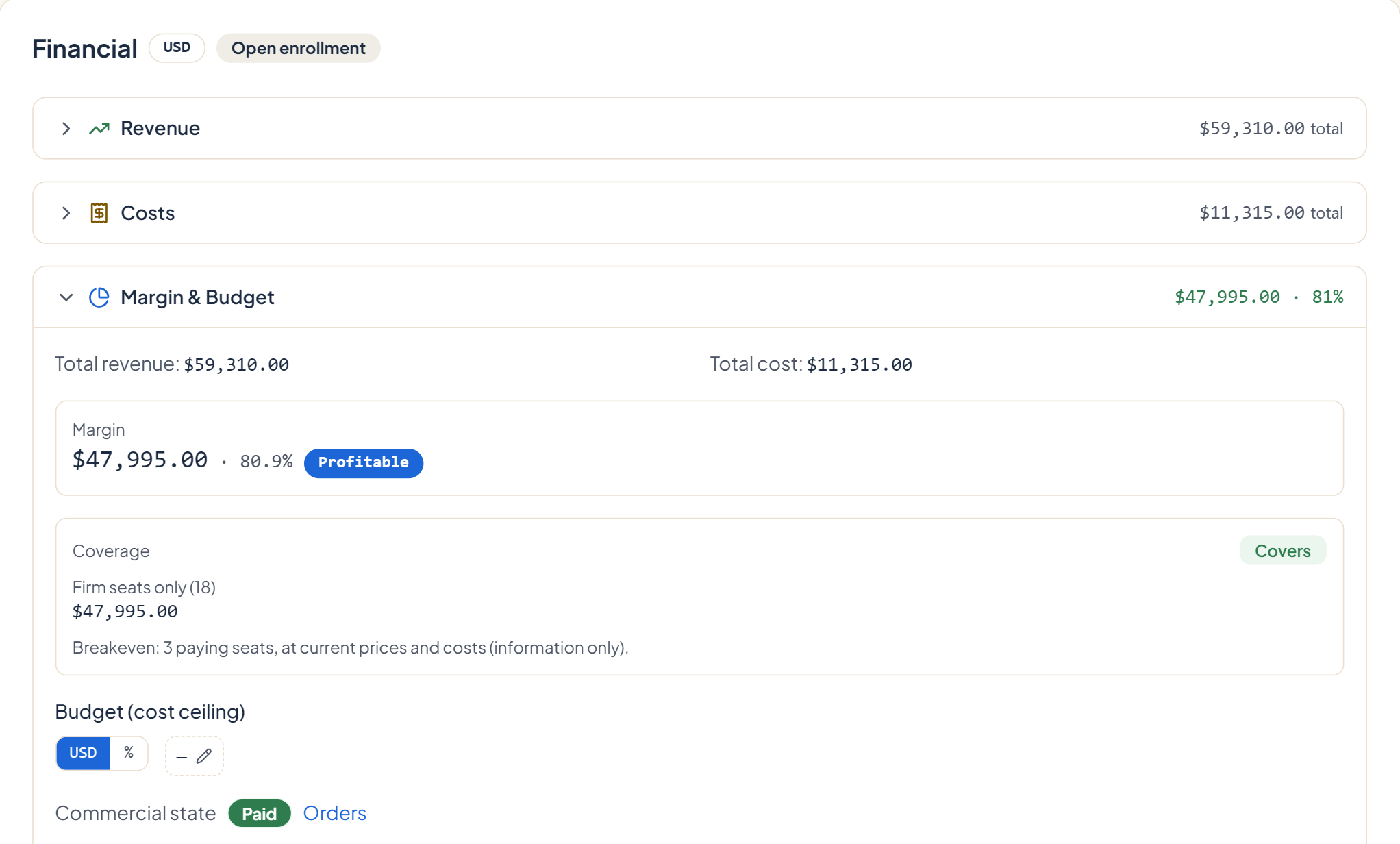
✓Per-course money: costs, revenue, margin, breakeven and a detailed cost breakdown
✓Who pays report: learners, attendance, completions and certificates for each paying company, down to each learner
✓Learning paths: guided setup, exams, paths inside paths and recommended earlier paths, and each learner's progress
✓Course bundles: several courses sold as one product at one price, with dates picked now, a fixed cohort or credits used later
✓Rooms within venues and per session, with no room booked twice and a free room proposed when you reschedule
✓Audit log: who changed what, and when, field by field
✓Your brand colors across the app
✓Automatic learner emails: confirmations and reminders sent on time, switched on in Settings or per event type
✓Automatic survey sending: personal links at the last session or the course end, reminders to those who have not answered
✓Automatic certificates
✓Client portal (25 contacts), with each course's evidence pack published to your client
Support: email · 48h response
Most popular
Professional
Operate with control, visibility, and your brand front and center.
Everything in Growth, and:
✓GO / NO-GO workflow: risk flags and alerts before a course slips
✓Multi-currency: per-course currency with automatic conversion
✓Calendar sync: course changes pushed automatically to your instructors' calendars, and their busy time read back
✓Smart notifications: per-course recipients and contextual alerts
✓Predefined roles with editable permissions
✓Advanced reporting with the revenue forecast from your sales pipeline, and instructor utilization with idle time and idle cost
✓Operational centers: organize and report across multiple delivery centers
✓A price and a default currency per operational center: each center's courses start at its own price, in its own currency
✓Billing API: your accounting system reads what to invoice and sends back invoice numbers, payments and credit notes
✓Read API: your own systems and Power BI read courses, sessions, enrollments, attendance, contacts, companies, certificates and instructors, with "changed since"
✓Webhooks: your other systems hear about every change as it happens, signed and retried
✓Your own certificate templates
✓Client portal with 250 contacts
✓No “Powered by Deliverr” on what your learners and client contacts see: emails, survey pages and your public course pages
✓A starting dashboard layout for each role
Support: email · 24h response · chat coming soon
Enterprise
Scale with custom capacity, governance and contract terms.
Everything in Professional, and:
✓Custom roles: create your own roles and decide what each one can do
✓Users limited to some operational centers: each coordinator sees only their centers' courses, orders, reports and alerts
✓Custom fields: adapt the platform to your internal processes (coming soon)
✓Full write API (coming soon)
✓Custom reporting: build your own reports, pick the data, columns and chart, and share them (coming soon)
Every plan includes onboarding support and access to all future updates within your tier.
Feature
Core
Growth
Professional
Most popular
Enterprise
Session credits / yearOne credit is one course day, 15 at most per course however long it is, used when a course is confirmed or starts. The allowance renews every year, and extra credit packs are available. Enterprise adds permanent blocks instead.
250
650
1,200
Custom
Staff usersBack-office accounts for your team. Instructors don't count toward this limit.
2
6
12
Custom
StorageSpace for course documentation files. You get a warning at 75%; uploads are never blocked.
2 GB
5 GB
15 GB
Custom
Course scheduling: consecutive days
✓
✓
✓
✓
Flexible scheduling: weekly pattern
✓
✓
✓
✓
Advanced scheduling: custom pattern
✓
✓
Multi-instructor and panelist support (up to 10 + 10)
✓
✓
✓
✓
Course modalities (virtual, on-site, hybrid)
✓
✓
✓
✓
Timezone engine
✓
✓
✓
✓
Calendar export (ICS, basic)
✓
✓
✓
✓
Calendar sync: automatic updates (Outlook / Microsoft 365)
✓
✓
Calendar sync: additional providers
Soon
Soon
Conferencing session created automatically (Zoom, Webex, Teams)
✓
✓
✓
✓
Rooms within venues, with double-booking checkRooms inside each venue, with their capacity. A room cannot be booked twice at the same time, by another course or by a room block. The calendar shows the rooms by week and by month.
✓
✓
✓
A room per session, checked when you rescheduleEach session can have its own room; the course's room is the default. When you move a session, or every session from one onwards, Deliverr checks the room on each new date and proposes a free room of the venue with enough seats before saving.
✓
✓
✓
Asset management
Soon
Soon
Soon
Proof of Delivery (PoD) upload
✓
✓
✓
✓
Labs and materials per event type
✓
✓
✓
✓
Unlimited instructors in every plan
✓
✓
✓
✓
Instructor finderFind the right instructor by the courses they are qualified to teach, languages, availability, score and upcoming workload. From Growth, users with financial access also see daily rates.
✓
✓
✓
✓
Instructor double-booking blockedAn instructor cannot be assigned to two courses at the same time, or on days they blocked or marked as unavailable. Checked every time a course is saved.
✓
✓
✓
✓
Instructor availability: blocked days and own schedule in their timezone
✓
✓
✓
✓
Instructors without platform accessAdd freelance instructors who do not need a login, with private notes only your team sees.
✓
✓
✓
✓
Instructor extended profile
Soon
Soon
Soon
Soon
Instructor data import
Soon
Soon
Soon
Expense approval workflowToday instructors already upload their expense report to the course. What is coming is approving it inside Deliverr.
Soon
Soon
Email notifications (basic)
✓
✓
✓
✓
Weekly digest email
✓
✓
✓
✓
Smart notifications (contextual and risk)
✓
✓
Workflow intelligence and auto-confirmation
✓
✓
Consolidated risk view
Soon
Soon
Course activity logThe chronological log of each course, written by your team. Available in every plan.
✓
✓
✓
✓
Audit log: who changed what, and whenEvery change, with the field before and after, searchable.
Learners told when course details they received change: what changed, by hand, with a flag and team warnings until they know
✓
✓
✓
✓
Messages to the bill-to contact: reservation received and expiring, order confirmation with a PDF (not an invoice), cancellation fee; by hand or automatic
✓
✓
✓
Custom workflow rules
Soon
Custom course statuses
Soon
Revenue and margin tracking (per course)
✓
✓
✓
Cancellation fee: cancelled courses the client still owes
✓
✓
✓
✓
Advanced cost breakdown
✓
✓
✓
Multi-currency
✓
✓
Price and default currency per operational center
✓
✓
Learning credits (CLCs and equivalents)
Soon
Soon
Soon
Course prices and revenue model
✓
✓
✓
✓
Orders and reservations: PO, cancellation and no-show fees
✓
✓
✓
✓
Billing page: what to invoice, invoice data export and invoice list importYour accounting system issues the invoices from it, or Deliverr does where it can (see below).
✓
✓
✓
✓
Deliverr issues and sends your invoices and credit notes, if you have no accounting systemFor organizations invoicing from the United States, the United Kingdom, Canada, Australia or New Zealand. Elsewhere your accounting system issues them.
✓
✓
✓
✓
QuickBooks Online connector: invoices sent, payments back
✓
✓
✓
✓
Tax per course and per center, tax-exempt customers, and reports with or without tax
✓
✓
✓
✓
Prepaid credit and account balance for each customer
✓
✓
✓
Payment terms by payment method, days before the course or due on receiptBelow Professional, each company's net days.
✓
✓
Billing triggers: orders ready to invoice on their own, at order, at confirmation or after the course
✓
✓
Course coverage: firm and reserved seats, courses below minimum
✓
✓
✓
✓
Course catalog and publishingPages hosted by Deliverr with your own subdomain or a folder of your own website, embeddable blocks for your website, your colors and navigation.
✓
✓
✓
✓
Enrollment management
✓
✓
✓
✓
Waitlist with automatic seat offers
✓
✓
✓
✓
Seat offers emailed to the learner, accepted or declined online
✓
✓
✓
✓
Seat offers emailed automatically
✓
✓
✓
Online enrollment and payment from your catalog
Soon
Soon
Soon
Soon
Attendance per learner and per session: marked on a phone, walk-ins, optional entry/exit times, ID check and signed sheets; each learner's participation % against a completion threshold
✓
✓
✓
✓
Attendance with no connection: marks, times, ID check, walk-ins and sign-in sheet photos taken offline, sent on their own when the connection returns; Deliverr can be added to the phone's home screen
✓
✓
✓
✓
Instructor app for iOS and Android: courses, sessions, learner lists and attendance, even offline
Soon
Soon
Soon
Soon
Completion certificates with your branding: up to two signatures, your seal and partner logo; issued to one learner or all eligible, emailed, with a public verification page per code
✓
✓
✓
✓
Instructor teaching credentials: printed under the instructor's signature, with a warning when one is missing or expires before the course ends
✓
✓
✓
✓
Automatic certificates: issued and emailed to each eligible learner once the course is completed
✓
✓
✓
Own certificate templates: your design as a fillable PDF (start from our starter template with every field placed), filled with each learner's data
✓
✓
Client portal: your clients' contacts see their courses, people, certificates and orders (25 contacts on Growth, 250 on Professional)
✓
✓
✓
Evidence packs in the client portal: attendance, sign-in sheets, certificates and Proof of Delivery for each course, published by hand or automatically once the course is in order
✓
✓
✓
Client portal self-service: your clients name learners, book seats, add POs and request courses
Soon
Soon
Learning paths
✓
✓
✓
Course bundles: several courses as one product
✓
✓
✓
Opportunity pipeline (board and list views)
✓
✓
✓
Opportunity detail and inline editing
✓
✓
✓
Activities, follow-ups and next actions
✓
✓
✓
Closed Won: creates the course or the enrollment, pre-filled
✓
✓
✓
Win / loss reporting
✓
✓
✓
One proposal, several courses
✓
✓
✓
Planning views: courses to fill, demand without a date, learners missing a course
✓
✓
Forecast with the sales pipeline: weighted and best case per month or quarter, and per account manager
✓
✓
Contacts (point of contact, provider, learner)
✓
✓
✓
✓
Companies and account management
✓
✓
✓
✓
Communications history per contact and per course
✓
✓
✓
✓
Advanced CRM: bulk operations, segments and tagging
✓
✓
Dashboard with “Needs attention” first, arranged by each person: widgets, widths and periods
Who pays report: learners, attendance, completions and certificates per paying company
✓
✓
✓
Instructor utilization, idle time and idle cost
✓
✓
Client health: the clients who are slipping away, with their trend
✓
✓
Custom reporting: build, save and share your own reports
Soon
Charts and CSV and Excel export on every report
✓
✓
✓
✓
External surveys (link and results upload)
✓
✓
✓
✓
Deliverr Assessments: survey and quiz templates, a personal link per learner and a course link with QR code, matched to enrolled learners; quiz score, pass or fail, a final result per learner and a certificate condition
✓
✓
✓
✓
Automatic survey sending: personal links when the last session starts or the course ends, and up to 2 reminders to those who have not answered
Your own domain for the platform and for emailsThe platform at an address on your domain (for example training.yourcompany.com), and the emails Deliverr sends coming from your domain instead of ours. Set up together.
Soon
Soon
Hide “Powered by Deliverr” from learners and clientsTurn off the Deliverr mark at the bottom of the emails your learners and client contacts get, your survey pages and your public course pages. Your team still sees it in the app.
✓
✓
Role-based permissions
Predefined roles
Predefined roles
Editable permissions
✓Custom roles
Operational centers (multi-center)
✓
✓
Limit users to some operational centers: courses, bundles, orders, reports and alerts of their centers only
✓
Custom fields
Soon
Billing API
✓
✓
Read API
✓
✓
Webhooks
✓
✓
Full write API
Soon
Integrations with your systems: connectors on requestIf you need Deliverr connected to a system we do not cover yet, we build the connector. Available on every plan.
On request
On request
On request
On request
Multi-language
✓
✓
✓
✓
Full data export, one click (no lock-in)
✓
✓
✓
✓
Training Manager Assistant (TMA)The AI usage included grows with the plan.
Soon
Soon
Soon
Soon
Risk detection AI
Soon
Instructor recommendation AI
Soon
Email support
✓
✓
✓
✓
In-app help and feedback: ask, report a problem or suggest an idea from any page
✓
✓
✓
✓
In-app chat support
Soon
Soon
Dedicated contact
✓
✓Included
Not included
Basic / PartialLimited version included
SoonComing soon
Session Credits are used when a course is confirmed or starts: dates you cancel before that are free. A course never uses more than 15, however long it is.
One flat price per plan, based on course days. No fees per learner, per registration or per enrollment. Guided Start is included in every plan with no setup fee, and an optional White-Glove setup is available if you want us to do it for you.
Some software keeps you by keeping your data hostage. We don't. Download all your data in one click, on every plan, whenever you want. We'd rather you stay because you love Deliverr, not because you can't leave.
What you pay today
What does your current setup really cost?
CRM licenses, a system you maintain yourself, a TMS that charges per registration, and the tools around them add up every month. Tell us what you use and see what it costs you over five years.
Why it matters
Less firefighting. More capacity to grow.
When coordination is manual, your team's energy goes to keeping up, not moving forward. Deliverr changes that equation.
Hours back every week
Manual follow-ups, update chains, and timezone conversions, replaced by automated flows.
Fewer human errors
One source of truth for every course, instructor, and update, so nothing falls through the cracks.
Ready to scale
Handle more courses and more clients without adding headcount. That's the foundation for the next phase.
The best training companies don't just deliver well, they operate well. Deliverr is built to help you do both.
FAQ
Common questions
Deliverr is built for companies that deliver instructor-led training: public courses they sell themselves, private classes for a client, or delivery on behalf of a vendor. If your team coordinates instructors, clients, time zones and course schedules across spreadsheets, email and chat, or a CRM that was never built for training, Deliverr is built for you. Both the CEO who needs operational visibility and the Training Coordinator who lives in the day-to-day will find immediate value.
Excel and email work, until they don't. Every time a course changes, someone has to manually update the spreadsheet, notify the instructor, update the calendar, and inform the client. One missed step is all it takes for an error to surface at the worst moment. Deliverr centralizes everything so that one update reflects everywhere, automatically.
Generic tools are built for generic problems. Deliverr is built specifically for IT training operations, with instructor profiles, instructor qualification per course, timezone handling, calendar invites, proof of delivery, and financial modules that make sense in that world. You won't spend weeks configuring it to work the way your team already thinks.
A TMS, a training management system. The difference is worth knowing, because the two solve different problems. An LMS is where learning happens: it hosts your content, delivers courses online, and records what each learner completed. Deliverr runs everything around the delivery: which instructor, on which date, in which time zone, at which venue or conferencing link, at what cost, and with what evidence at the end. So Deliverr usually isn't a replacement for your LMS. It's the complement: if you run instructor-led training, the two sit side by side and each does the half the other doesn't. And in practice, what Deliverr replaces is rarely an LMS anyway. It's a spreadsheet.
Yes. Instructors have their own access with a role designed for them: they can view their assignments and update their availability, and soon submit their expense reports, without access to your back-office data. Each role is designed around what that person actually needs to see and do.
Most teams are up and running within days, not months. During a setup period of up to 30 days you configure, import your data and history, and practice with nothing reaching your learners, contacts or instructors. We walk you through it and make sure the platform matches how your operation actually works before you go live.
If your operation is larger than what the Professional plan covers, get in touch. We work directly with teams at higher volume and can build a plan that fits your scale.
Plans are annual, paid yearly or monthly. No multi-year commitment required. Getting started has no setup fee: you fill our import templates, we bring in your current data and your history, and your team learns with short videos. If you'd rather have us do it all, there is an optional White-Glove setup.
Because the right plan depends on what you need Deliverr to do (for example, a sales pipeline or the numbers of each course) and on how many course days you run and how many people manage them. In the demo we look at it together and tell you exactly which plan fits and what it costs. There are no per-learner fees and no surprises later.
A training management system runs the operation behind instructor-led training: scheduling courses, instructors and rooms, enrollments, conference links, communications with learners and the numbers of each course.
A CRM tracks contacts and deals. A TMS runs the course itself: dates, sessions, instructor, room, conference link, seats, enrollments and the cost of each course. Deliverr does both for training: it is a CRM for training providers, with the sales pipeline tied to each course, through to invoicing.
For selling training, yes. From the Growth plan, Deliverr has contacts, companies and a sales pipeline, tied to the courses you sell. If you also use your CRM for marketing campaigns, Deliverr does not replace that part.
No, and it doesn't need to. Your ERP keeps the accounting, invoicing, purchasing and HR of the whole company. Deliverr runs the training itself: courses and sessions, instructors with their qualifications and availability, rooms, conference links, seats and enrollments, and the cost and margin of each course. Some ERPs include an events or e-learning module, but those are built for one-off events or online content, not for live courses with instructors, several sessions and a minimum number of seats to run. The two work side by side: from the Professional plan, the Billing API sends your billing data to your ERP, the Read API lets it read the rest of your Deliverr data, webhooks tell it about every change, and if you need a deeper connection, we can build it for you, quoted separately.
Deliverr already connects with Webex, Zoom and Microsoft Teams, with Outlook calendars, and, in every plan, with QuickBooks Online. From the Professional plan, the Billing API sends your billing data to any other accounting system, the Read API lets your own systems and Power BI read your Deliverr data, and webhooks tell them about every change. If you need Deliverr to connect with your CRM or another tool, we can build the integration for you, quoted separately. Tell us what you use in the demo.
Yes. Deliverr was built by a founder who ran IT training for 25 years. It handles vendor courses, each vendor's requirements per course, and instructors in different countries and time zones.
Yes. Every course shows its times in your organization's time zone, the venue's local time and the instructor's time zone, and daylight saving time is handled automatically. Double-booking an instructor or a room is blocked before it happens.
Yes, in every plan. Deliverr creates the meeting and its links for each course with your own Webex, Zoom or Microsoft Teams account, including multi-day courses, and keeps them updated when the dates change.
Yes, in every plan. Use pages hosted by Deliverr, with your own subdomain or a folder of your own website if you want, or embed the course calendar on your current website. Courses update on the site as you change them in Deliverr.
Yes. From the Growth plan, each course shows its costs (instructor, venue, materials), its margin and its breakeven, and firm seats against reserved ones, so you decide whether it runs on the numbers, not on a feeling.
Yes, in every plan. Instructors take attendance per session from their phone, even with no connection, and you issue completion certificates with your logo, never ours, with a public verification page. From the Growth plan, certificates can be issued automatically.
Yes. You fill in our import templates and we bring in your current data: courses, instructors, contacts, companies and upcoming enrollments. If you prefer, White-Glove setup does it for you.
No lock-in. You can download all your data in one click at any time, on every plan, from Settings → Data export: a CSV per table, or everything in one ZIP. After you cancel you still have 30 days to export it, and we can send you one complete export, uploaded files included, at no cost.
Yes. Each course has its own currency, so you can sell courses in different currencies. From the Professional plan, costs can be entered in the currency they were paid in, and Deliverr converts them to the course currency to show the real margin.
Deliverr is multilingual: the interface and learner emails are available in several languages, and each user picks their own. Tell us which languages your team and learners need, and we'll confirm what's available for you.
Stop running training operations on spreadsheets.
Book a 45-minute demo and see how Deliverr works for your team.
No commitment. No long sales process.
Book a Live Demo
45 minutes with one of the founders, no obligation.
We use analytics and advertising cookies (Google Analytics, Contentsquare heatmaps and session replays, and the LinkedIn Insight Tag) to understand how visitors use this site and measure our LinkedIn campaigns. What you type in forms is never recorded. They stay off unless you accept.