Best CRM for training providers: why a generic CRM falls short

Published
What a CRM for training providers is
A CRM (customer relationship management system) keeps your contacts, companies and deals in one place, so your sales team knows who to call and what’s about to close. A CRM for training providers does that around the thing you actually sell: a course on a date, with a limited number of seats, that may not run if it doesn’t fill.
For most training providers that run live courses, the best CRM is a training management system (TMS) with the CRM built in, because the deal and the course live in the same place.
Think of an airline that sells its flights from a CRM. It knows who wants to fly, but not how many seats are left on Tuesday’s flight, which crew is free that day, or whether the flight has enough passengers to take off. No airline works that way, yet that’s how many training companies sell their courses: a CRM for sales, a spreadsheet for courses, and someone copying data from one to the other every week.
Where a generic CRM stops
HubSpot, Salesforce, Pipedrive and the like are good at what they do: contacts, companies, a sales pipeline, emails and follow-ups. For a training provider, they stop at the point where the deal turns into a course. Follow one deal and you can see where.
A company asks for Project Management training for fifteen people. Your salesperson creates the deal and adds “Project Management, 3 days” as a product. That’s as far as the CRM goes. It doesn’t know which dates you have scheduled, how many seats are left on each, or that another deal is after the last three seats of the same date.
The company says yes. In the CRM, the deal moves to won, and nothing else happens. Someone in operations has to create the course, or add the fifteen learners to one that already exists, and then create the order, copying names and prices from one system to the other.
Meanwhile, another date is one seat short of running. The minimum seats, the confirmation deadline and the cost of the course live somewhere else, so sales never sees that one more seat on that date is the difference between running it and cancelling it.
Two weeks before the course, the instructor drops out and the dates move by a day. Someone checks three calendars and a spreadsheet to find another instructor who can teach it and isn’t booked elsewhere. Then the meeting has to be rebuilt in Zoom or Teams, the new link resent to fifteen learners, the course page on your website corrected, and the salesperson told, if anyone remembers. The CRM sees none of it.
After the course, attendance, certificates and the feedback survey go out by hand, from a list exported from somewhere. Months later, the same company asks for its people’s certificates and which course each of them should take next. The CRM has the buyer, but each learner’s history is scattered across spreadsheets and emails. And every change to a date, an instructor or a price had to be copied into the CRM by hand, so by now nobody fully trusts either side.
If you have run a training company on a CRM, you have probably lived every step of this.
What a CRM for training providers should do
Whether you extend a CRM or pick a system built for training, check these in the demo:
- Contacts and companies, with their training history. Who bought, who attended, what each person completed and which certificates they hold.
- A sales pipeline tied to courses. Each opportunity points to a course and a date, or to a request for a date that doesn’t exist yet.
- One proposal, several courses. A company often buys a package: three courses for fifteen people over six months.
- Closing creates the work. A won deal adds the seats to an existing course, or creates a new private course, with the order for the company.
- Sales can see the courses. Seats left, minimum to run and the confirmation deadline, so the team knows which dates to push. And when a course a deal is tied to moves or is cancelled, the salesperson is told.
- Changes flow on their own. When a date or the instructor changes, the meeting links, the calendars and the reminders to learners update without anyone rebuilding them.
- Your website from the same data. Course pages and dates on your site come from the system that runs the courses, so a date or a price is never out of date there.
- The right instructor, without the hunt. Only instructors qualified for the course who are free on those dates, with double-booking blocked.
- Orders and invoicing for the company, with its purchase order, not only for the learner.
- Communications in one place. Emails to contacts and learners, with a history of what was sent to whom.
- The close of the course, without exports. Attendance per learner, certificates anyone can verify, and the survey sent when the course ends.
- A win and loss report, to see why deals close or don’t.
- No double entry. If you keep a separate CRM for marketing, ask how the two connect, who builds the connection and what it costs, so the training data doesn’t have to be copied by hand between them.
- Reports on the training, not only the sales. Seats filled per course, margin per course, instructor workload, and which certificates are about to expire, so sales knows whom to call for the renewal.
- Support and time to start. Who imports your contacts, companies and past courses, and how many weeks it takes to go live.
CRM, TMS or both?
A training management system (TMS), also called training management software, runs the courses: dates, instructors, rooms, bookings, orders, the numbers of each course and the close. Some TMS include the CRM part too: contacts, companies and a sales pipeline tied to the courses. That’s usually the simplest setup for a training company, because the deal and the course live in the same place.
| Generic CRM | TMS with CRM built in | |
|---|---|---|
| What you sell | Products and deals | Courses on dates, with limited seats |
| When a deal is won | The deal closes | The seats go into a course, with the order |
| Learners | Contacts of the buyer | Each learner’s courses, results and certificates |
| Seats | Checked in a spreadsheet | Firm, reserved and minimum seats on every date, with a waitlist |
| Operation | Not covered | Instructors, rooms, sessions and time zones |
| When a date or instructor changes | Copied by hand into the CRM, the meeting and the website | Changed once: meeting links, calendars and reminders follow |
| Your website | Updated by hand | Course pages fed by the same data |
| Communications | Sales and marketing emails | Joining instructions, reminders, surveys and certificates |
| Reports | Pipeline, deals won and lost | Also seats filled, margin per course and instructor workload |
- A CRM alone works if you sell very few dates and someone can keep the courses by hand.
- A TMS with CRM built in works for most training providers that sell live courses to companies and individuals.
- Both, connected, makes sense if your marketing team already lives in a CRM for campaigns. Then the TMS runs the training and the CRM runs marketing. Keeping your CRM is fine; just ask how the two will be connected, because few TMS ship a ready-made connector for every CRM and it is often built on request.
How Deliverr handles the sales side
Deliverr is a TMS for companies that run live courses, with the CRM built in, so the deal and the course live in the same place. Take the same deal. Your salesperson creates the opportunity on the pipeline board and adds the courses in the proposal: several in one deal, or a bundle sold as one product at one price. When the company says yes, the won deal goes straight into an existing course or creates a new private one, with the order for the company that pays and its purchase order.
 From the board to a won deal, linked to the course it filled.
From then on, the company’s page holds its whole history: the courses its people took, their results and certificates, and every email sent to its contacts and learners. A win and loss report shows why deals close or don’t, and a portal lets your client companies see their people’s courses, results, certificates and orders on their own.
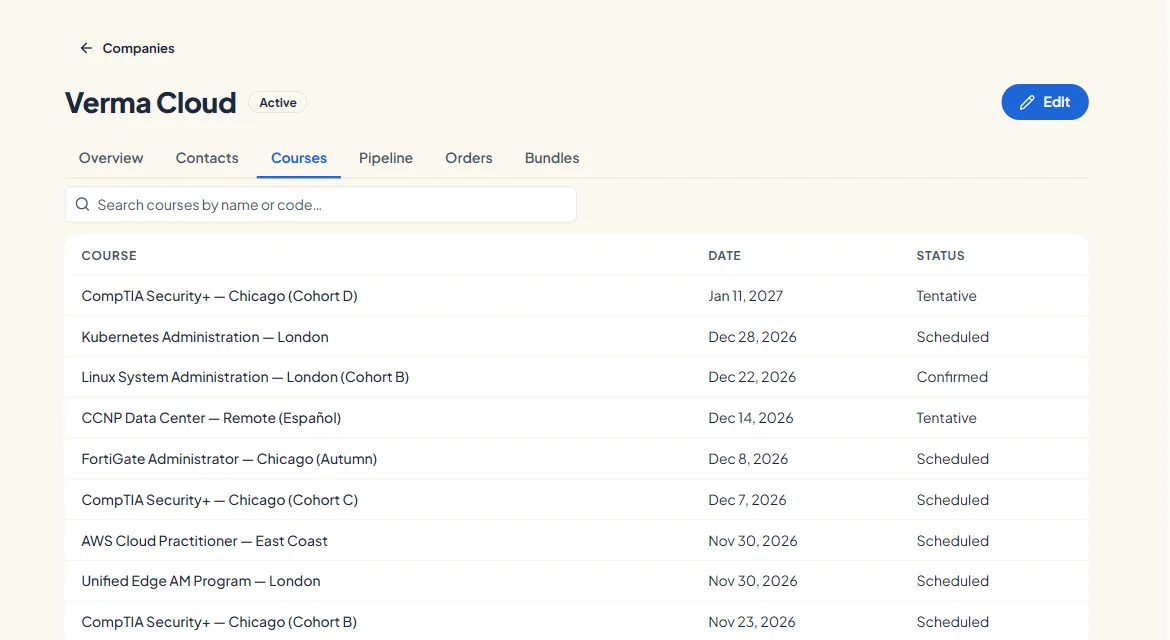 Every course a client company has booked, in one place.
The course side runs in the same place. When you pick the instructor, you only see the ones qualified for the course and free on those dates, and double-booking is blocked. Each session gets its Zoom or Webex meeting, and if the date or the instructor changes, the meeting is updated and each learner gets the day’s link. Your course pages and the calendar on your website come from the same data, and the salesperson whose deal is tied to the course is told when it moves. After the course, attendance, certificates that anyone can verify and the survey go out from the course itself.
If you’d rather keep your CRM for marketing, that works: Deliverr runs the training next to it, and we build the connection to your CRM on request.